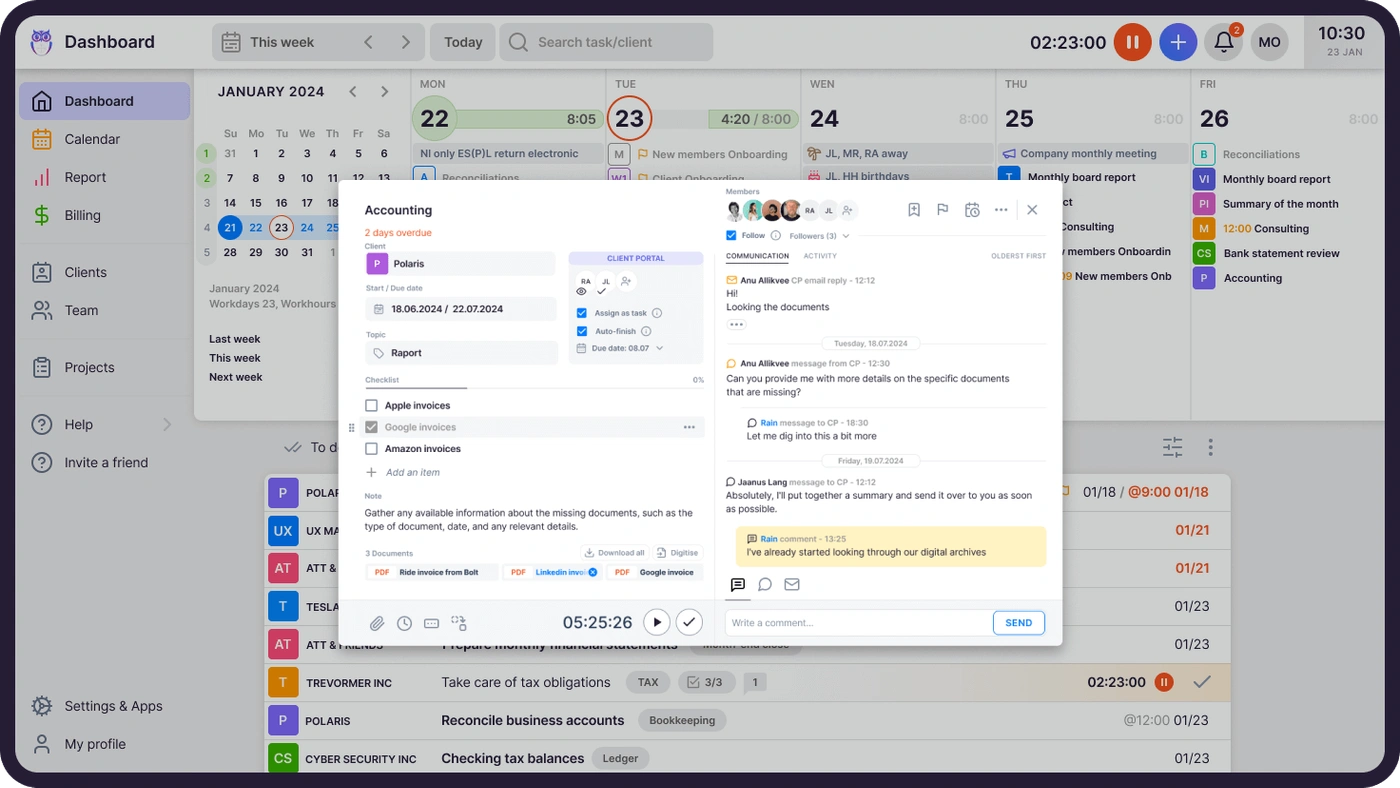
Best CRM for Accounting Firms in 2026
The best CRM for accounting firms in 2026, ranked: Uku, Karbon, TaxDome, Canopy, Financial Cents, HubSpot, Salesforce and Zoho CRM compared.


Contents
- The best CRM for accounting firms in 2026
- Which one do you need?
- What an accounting firm CRM actually has to do
- Where a separate CRM still wins
- What is CRM?
- Who uses CRM software?
- Accounting firm CRM, is it necessary?
- How to use CRM as an accountant?
- Is it necessary to use separate CRM and accounting software?
- How to use Uku as CRM accountants and bookkeepers can benefit from?
- Accounting firm CRM: common questions
The short answer: most accounting firms should not buy a sales CRM. A CRM is built to move deals through a pipeline. An accounting firm’s real problem is different — hundreds of recurring client relationships where the important record is not “where is this deal”, but who does what for this client, by when, and at what margin. That record belongs where the work already lives, which is your practice management software, not in a second system beside it.
Buy a standalone CRM when winning new clients is a genuine, staffed process with a pipeline someone owns. Everyone else is better served by the client database inside the tool their team already opens every morning — because a CRM nobody opens is worse than a spreadsheet everybody does.
This guide covers what an accounting CRM actually has to do, which of the two categories fits your firm, and what the options are in each.
The best CRM for accounting firms in 2026
“Best CRM for accounting firms” has no single answer, because the tools that show up under that search are two different products wearing the same label. We ranked each group separately, on the criterion that actually decides whether a firm keeps using the tool: practice-management CRMs are ranked by how much of the accounting-specific CRM job — identity, access, scope, work history, correspondence, profitability — comes built in without an add-on, at what entry price; sales CRMs are ranked by how easily a firm with a staffed sales motion can get from signup to a working forecast. All prices below are USD, per user/member per month, from each vendor’s own US pricing page, checked in September 2026 — see the source link under each entry.
| Tool | Type | Best for | Starting price (USD) | Standout | Limitation |
|---|---|---|---|---|---|
| Uku | Practice-management CRM | Firms whose bottleneck is delivering recurring client work | $19/mo (Solo, 1 member) · $38/member/mo annual (Team) | Client record, billing, time and Client Portal in one profile from the entry plan | No pipeline forecasting, lead scoring or marketing automation |
| Financial Cents | Practice-management CRM | The cheapest way into a full team plan | $19/mo (solo, 1 user) · $49/user/mo annual (Team) | Lowest published team-plan price in the category | Team and Scale plans need a 5-user minimum on monthly billing |
| Karbon | Practice-management CRM | Firms whose real bottleneck is shared inboxes and email triage | $59/user/mo annual (Team) | Shared email triage built into the workflow, not bolted on | Monthly billing only opens up at 4+ users; jump to Business ($89/user/mo) to unlock more templates and teams |
| TaxDome | Practice-management CRM + client portal | Document- and signature-heavy firms (tax prep, bookkeeping with lots of client uploads) | $800/seat/yr on a 1-year term (Essentials, solo only) | Deep client-portal and e-signature workflow | Priced and billed by the year, not the month — harder to trial at low commitment |
| Canopy | Practice-management CRM + tax resolution | Firms that do IRS tax-resolution work alongside compliance | $74/user/mo annual (Standard) | Tax Resolution and Tax Workflow Automation modules no general practice tool offers | Automation and resolution modules are separate paid add-ons on top of the seat price |
| HubSpot (Sales Hub) | Sales CRM | Firms starting a real outbound sales motion, who want marketing automation too | Free CRM · $7/seat/mo annual (Starter) · $90/seat/mo (Professional) | Free tier to start, and marketing automation a firm can grow into | Nothing accounting-specific — no client work, time or billing; Professional/Enterprise add $1,500–$3,500 onboarding fees |
| Salesforce (Sales Cloud / Financial Services Cloud) | Sales CRM | Firms scaling a dedicated sales team, or ones that already sell wealth/advisory services under Financial Services Cloud | $25/user/mo annual (Starter Suite, Sales Cloud) · Financial Services Cloud from $325/user/mo (Sales Core) | The most configurable pipeline and forecasting engine in this list | Cost and setup complexity scale fast; Financial Services Cloud is priced for advisory/wealth work, not compliance delivery |
| Zoho CRM | Sales CRM | Firms already running other Zoho apps who want the cheapest entry into a full CRM suite | Free (up to 3 users) · paid tiers from Standard upward, see vendor page for a USD quote | Free tier plus the widest CRM feature set for the money among generic CRMs | Zoho’s own pricing page renders in your local currency by IP; get a written USD quote before you commit |
1. Uku — best practice-management CRM for firms whose bottleneck is delivery
Uku is practice management with the client record built in, not a CRM with practice management bolted on. The client profile holds contacts, notes, documents, custom fields, stored passwords and bank or tax-authority access rights, next to that client’s task plan, time entries and invoices — the record that answers “who does what for this client, by when, and at what margin.” Client data imports from Excel or directly from QuickBooks, Xero and e-conomic instead of being retyped, and the Client Portal is where the record becomes something the client can see. Team is $38/member/mo billed yearly ($49 monthly); Solo, for a single member with up to 20 active clients, is $19/mo billed yearly ($25 monthly) — see the full pricing breakdown. Uku’s honest limitation: no pipeline forecasting, lead scoring or marketing sequences, because those are a different job than the one this record does.
2. Financial Cents — cheapest full team plan
Financial Cents prices a solo, single-user plan at $19/mo and a Team plan at $49/user/mo billed annually ($69/user/mo monthly, 5-user minimum) — the lowest published team-tier price among the practice-management tools here. Scale, its “Most Popular” tier, runs $69/user/mo annual. The trade-off at that price is a smaller feature set than Karbon or Canopy once a firm outgrows the basics; add-ons like Month-End Close are billed separately at $5/client/mo.
3. Karbon — best for firms whose bottleneck is shared email
Karbon is built around a shared inbox that turns client emails into assignable work, which is its real differentiator over a CRM with a notes field. Team is $59/user/mo billed annually ($79/user/mo monthly, minimum 4 users to bill monthly), with 40 work templates and 1,000 contacts; Business is $89/user/mo annual ($99 monthly) for unlimited contacts and more teams. Enterprise is custom-priced. The limitation is the same one every collaboration-first tool has: the richer the email workflow, the steeper the learning curve for a small team.
4. TaxDome — best for document- and signature-heavy client work
TaxDome charges per seat, per year, not per month: Essentials (solo users only) is $800/seat on a 1-year term ($700/seat on a 3-year term), Pro is $1,000/seat/yr, and Business is $1,200/seat/yr, with shorter-term seasonal and temporary-seat pricing available. Its strength is a client portal built around document collection and e-signature at volume — useful for tax-season firms with heavy upload traffic. The annual, upfront billing structure makes it a bigger commitment to trial than a monthly tool.
5. Canopy — best for firms doing IRS tax-resolution work
Canopy starts at $74/user/mo annual (Standard), $109/user/mo (Plus, its “Most Popular” tier) and $149/user/mo (Premium), with Enterprise custom-priced for large firms. What sets it apart from the rest of this list is a genuine Tax Resolution module (from $50/user/mo) and Tax Workflow Automation (from $34/client credit) — features built for firms that represent clients in front of the IRS, not just compliance delivery. Those modules are paid add-ons on top of the seat price, so the sticker price understates the cost for a firm that needs them.
6. HubSpot — best free-to-start sales CRM
HubSpot is the sales CRM most firms already know: a genuinely usable free tier (up to 2 users, 1,000 contacts), then Starter at $7/seat/mo annual, up through Professional at $90/seat/mo and Enterprise at $150/seat/mo — the tiers where marketing automation and reporting become real. That is also where the cost lands: Professional and Enterprise carry $1,500–$3,500 one-time onboarding fees on top of the seat price. HubSpot knows nothing about a VAT return, a billing contract or a tax-authority access right — a firm that adopts it still needs a place those live.
7. Salesforce — best for a firm already scaling a dedicated sales team
Salesforce Sales Cloud starts at $25/user/mo annual (Starter Suite) and scales through Pro Suite ($100), Core ($195), Advanced ($395) up to Max ($550/user/mo) — the most configurable forecasting and pipeline engine on this list, at a price and implementation cost to match. Firms that already sell wealth-management or advisory services alongside compliance work should look at Salesforce Financial Services Cloud instead, which starts at $325/user/mo (Sales Core) and is purpose-built for regulated financial-advice relationships — not a fit for a firm whose work is tax and bookkeeping delivery.
8. Zoho CRM — cheapest entry if you already run other Zoho apps
Zoho CRM offers a free edition for up to 3 users and paid tiers above that; get a written USD quote from Zoho directly, since its pricing page serves currency by IP and did not render US dollars from every location we checked it from. Its case for an accounting firm is bundling: a firm already on Zoho Books or Zoho Projects can add Zoho CRM to the same ecosystem rather than integrating a third-party tool. It has the same limitation as every generic CRM on this list — no accounting-specific fields, no time or billing data, no client work record.
Which one do you need?
| Standalone CRM | Practice management with CRM built in | |
|---|---|---|
| Built for | Winning new clients | Serving the clients you have |
| Central record | The deal | The client and the work |
| Fits when | You have a named pipeline owner and outbound motion | Recurring compliance work is the bulk of revenue |
| Typical risk | Second system, duplicate client data, low adoption | Lighter on sales-pipeline reporting |
| Time tracking / billing | Rarely | Usually included |
Most firms under ~50 staff land in the right-hand column. If you already run one of the tools there, adding a separate CRM usually buys you a second place to keep the same client details out of date.
What an accounting firm CRM actually has to do
Sales CRMs are graded on pipeline — stages, forecast, close rate. An accounting firm’s client record is graded on something much duller and much more expensive to get wrong: whether the next person to touch this client can serve them without asking a colleague. Six jobs, and it is worth scoring any tool against them before you look at a feature list.
- Identity and contacts. Who the legal entity is, who signs, who sends the documents, and who to chase when the documents do not arrive.
- Access. Which bank, which accounting software, which tax-authority permissions — and who on your side holds them. This is the field a general-purpose CRM has never heard of, and the one that stops a substitution dead.
- Scope. What the firm agreed to do for this client, at what price, on what schedule. Not a note somebody typed once, but a record you can compare actual work against.
- Work history. Every task done for this client, by whom, when, and how long it took.
- Correspondence. The thread attached to the client, rather than sitting in one person’s inbox while that person is away.
- Profitability. Hours spent against fee charged, per client, without an export and a pivot table.
A sales CRM does 1 and 5 well, 2 badly — as custom fields somebody has to maintain by hand — and 3, 4 and 6 not at all, because it holds no time or billing data to compute them from. That is the whole argument in one paragraph: the fields that matter most in an accounting firm are the fields a pipeline tool has no reason to carry.
“As my everyday job is to manage client data UKU made huge difference. Now I have agreements, contact information and all relevant data at the same place.”
Where a separate CRM still wins
Being straight about this saves a firm three wasted months. There are things practice management genuinely does not do, and if you need them, buy the CRM.
- A forecast. Weighted pipeline value, stage conversion, expected close dates. A client list with a “Leads” group tells you who you are talking to, not what next quarter looks like.
- Marketing automation. Nurture sequences, behavioural segmentation, landing pages, lead scoring.
- Attribution. Which source produced which client, and what that source cost you.
- A sales team’s own workflow. If two or more people do nothing but win work, they need a tool of their own — and it should probably not be the one the delivery team lives in.
Uku sits on the other side of that line, and we would rather be precise than flattering about it. Uku is practice management with the client record built in: the client profile holds contacts, notes, documents, custom fields, stored passwords and bank or authority access rights, alongside that client’s task plan, time entries and invoices, with user rights deciding who sees what. Client data imports from Excel or straight from QuickBooks, Xero and e-conomic instead of being retyped. Uku does not do pipeline forecasting, lead scoring or marketing sequences. For most firms that trade is worth making, because the client record is the half somebody actually maintains.
What is CRM?
CRM is short for Customer Relationship Management. Companies primarily use it to improve customer experience and increase sales. CRM helps the company to be more organised and efficient, manage working time, and serve customers more conveniently.
Most CRM programs allow users to differentiate between clients and potential clients or leads, organise client communication (calls, agreements, emails), automate recurring tasks, and analyse collected data.
Many businesses use spreadsheets, databases, and apps when they could be using combined accounting CRM software instead.
Who uses CRM software?
Customer relationship management software is primarily intended for companies that offer business-to-business (B2B) services with a long sales process, such as real estate or accounting firms. It’s also become essential for service-focused teams, where a CRM for agencies helps streamline projects, track clients, and keep communication organized. A collective client base is also beneficial for companies offering remote work opportunities.
CRM functions offer the most value to a business’s sales department. In an accounting firm that department is usually a partner with a full client load, which is the honest reason most CRM rollouts here stall: the person who would maintain it is the person with the least time.
CEO or manager
The duties of a manager are wide-ranging. However, being a specialist in every field is challenging. This is where various software comes in handy, which helps the manager manage his company and employees better. CRM software with a convenient and practical design helps explain its content with visuals created from data, providing an overview of the team’s work.
An employee
As mentioned, CRM is a handy tool for a salesperson. However, CRM software for accountants is essential in an accounting firm. For example, accountants can add specific data to each client, such as which bank the client uses or who to contact if documents are missing.
In a bookkeeping CRM, you can add all kinds of information to the client profile, which helps communicate with the client. The details worth recording are rarely the sentimental ones — it is which bank the client uses, who has signing rights, which accounting software their ledger sits in, and what was agreed the last time the scope changed. Those are the notes a colleague needs at 9am on a Monday in someone else’s absence.
Accounting firm CRM, is it necessary?
Usually, accountants have their own ‘systems’ of dealing with clients who have served them well over the years. This ‘system’ can be in emails, an Excel spreadsheet, or even on paper stored in the office. Most probably use some form of accounting software. Accountants do not see themselves as ‘sales’ but recognise the need to sell their services to remain profitable and sustainable.
CRM for accounting practice should be a combination of people and technology
Most CRM software requires accountancy practices to be process-oriented. In other words, it concerns documentation accountants use to react to client engagement. Using CRM for an accounting practice to smoothen workflows is important.
The key to ensuring end-user adoption is to focus on what would make their life more comfortable to do their job and serve their customers better. Because if tasks are done on time, the customer is happy. From the outset, this fosters a positive relationship, discussing and selling more of a ‘client offering’ than directly selling.
The complexity of customer management depends on the size of the company. A small business with five clients can keep its data in a notebook and easily find it when needed. However, large companies have a much more complicated situation. The data of several hundred or even thousands of clients would require a library to store, and finding the correct data is a lot of work.
A detailed client database is why CRM for accounting firms gives extra value.
Keeping client data in one system when working with a team is very practical. This way, everyone can access essential data, even if an employee serving a customer goes on vacation or is not at the office.
CRM holds all client data that is always available for the whole accounting firm and keeps employees from puzzling. Substitution is the test that matters here, because it is the one moment when the quality of the record becomes visible to the client.
“Having a list of tasks under each client is very useful when we need to replace other employees.”
With the help of CRM, accountants can spend valuable time working rather than on customer management. Saving time comes from automating recurring accounting tasks. With the help of recurring tasks, you can create a workflow for client communication.
Avoiding human errors is also a bonus of the software. If the recurring task is well planned, it starts an efficient process. The correct recurring task will reappear on the desktop every month.
How to use CRM as an accountant?
Accounting CRM software provides value in several different ways. Client management starts even before the contract is signed. The first step is to win over the client. For this, it is necessary to carry out several processes, like negotiating with the client and conducting a background investigation.
Once you have entered existing and potential clients into the system, you can gather all their information using CRM software. This way, when employees get ill or go on vacation, a situation where an employee does not have information about a specific client will not arise. Using all the data, the accountant leaves the client feeling like they are their only client.
A personalised approach is the basis of a long-term customer relationship.
Is it necessary to use separate CRM and accounting software?
If you need a standalone CRM
These are general-purpose CRMs. None of them knows what a VAT return is, so expect to model your own client fields — and expect your client list to exist in two places from then on.
- Pipedrive — pipeline-first and the easiest to learn. Good if the point really is tracking deals to a close.
- Zoho CRM — the cheapest way into a full suite, and the one most likely to already be in the building if the firm uses other Zoho apps.
- HubSpot CRM — free tier to start; the cost arrives later, when marketing features become the reason you stay.
- Freshsales and Bitrix24 — mid-market alternatives; Bitrix24 bundles telephony and intranet, which is either a bonus or a lot of software you did not ask for.
- Capsule CRM — deliberately small and simple, which suits a firm that wants contact records and nothing more.
- Creatio CRM software and Firmao — heavier, process-configurable systems for firms that intend to model workflow inside the CRM itself.
- telecrm — built around calling and WhatsApp follow-up, so it fits practices whose intake happens by phone.
- Instantly CRM — outbound-email-led, for firms actively prospecting rather than fielding referrals.
- BIGContacts — contact management with light automation, positioned at small teams.
If you need client records where the work lives
This is the practice-management route: the client record sits next to the tasks, deadlines, time and invoices, so nobody maintains it twice. It is also, for most firms reading this, the column that actually applies — so it deserves more than one name in it.
The platforms an accounting firm shortlisting an “accounting CRM” will actually meet, each linked to our own review of it rather than to a feature list:
- TaxDome
- Financial Cents
- Canopy
- Karbon
- Client Hub
- Double
- Uku — our own tool, and the rest of this article shows exactly how its client record works, so you can judge the claim rather than take it.
We deliberately do not restate prices here: they move often enough in this category that a number printed in a buyer’s guide is usually wrong by the time it is read. The reviews carry them, dated.
It is worth noticing what this means for the search you probably just ran. Ask Google for “accounting CRM software” and a good share of what comes back is not a CRM vendor at all — it is a practice-management vendor’s own CRM page. That is the category answering the question in its own words, and it is a reasonable signal that the client record and the work belong in the same system.
The more advanced the software, the longer it will take to set up and deploy — and adoption, not features, is what decides whether a CRM survives its first busy season.
At this point it is worth weighing the time it takes to learn new software against what you would get from it. A standalone CRM for accountants earns its place once winning new clients is a real, staffed process with someone who owns the pipeline — not before.
CRM capabilities are also often added to work management software, which one could also call CRM accounting software. For example, work management software Uku has a simple, convenient design and includes CRM, task management, and invoicing automation.
How to use Uku as CRM accountants and bookkeepers can benefit from?
We at Uku base our CRM for accounting practices on a customer-focused approach. Naturally, we have workflow processes that you’d expect from all CRM software. Yet ours includes time tracking, so it is even easier to track all billable hours to determine how profitable a client is.
Every accountant using Uku can observe recorded transactional data and billed hours and how the customer wishes to interact, making it an invaluable tool for understanding what type of client you are dealing with and how you can improve customer satisfaction.
Finally, Uku’s powerful reporting will permit users to analyse the entire practice and determine which services sell more (or not), bring in more revenue, or take up more employee hours.
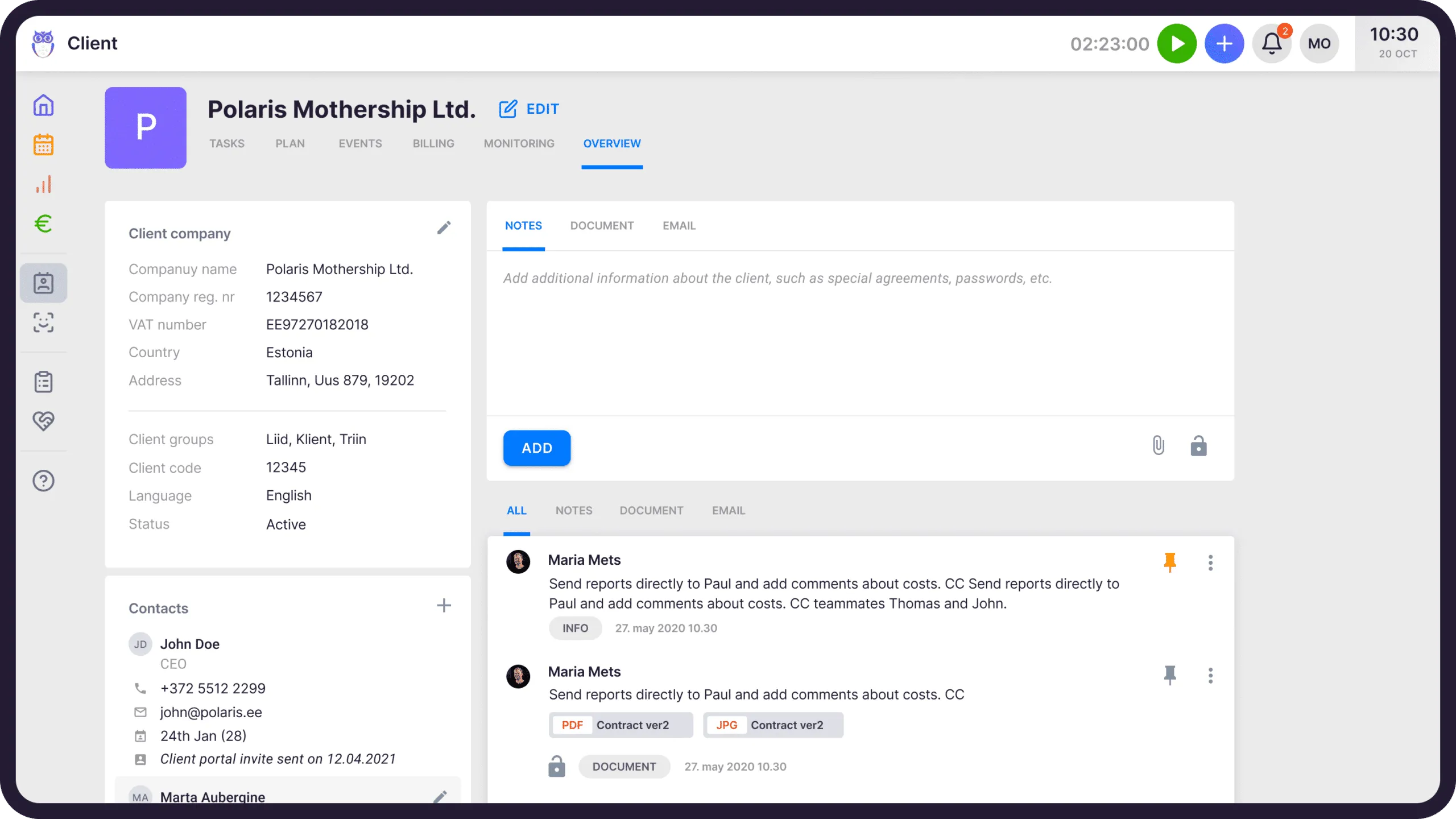
Customer profile
When you add clients to Uku, you have already started the process. Thoroughly add all necessary information about the customer to the client profile. In Uku, in addition to the mandatory fields, you can create custom fields based on your needs and add attachments, notes, and correspondence. We recommend taking advantage of all possibilities to prevent employees from having to look for information about the client elsewhere than in the software.
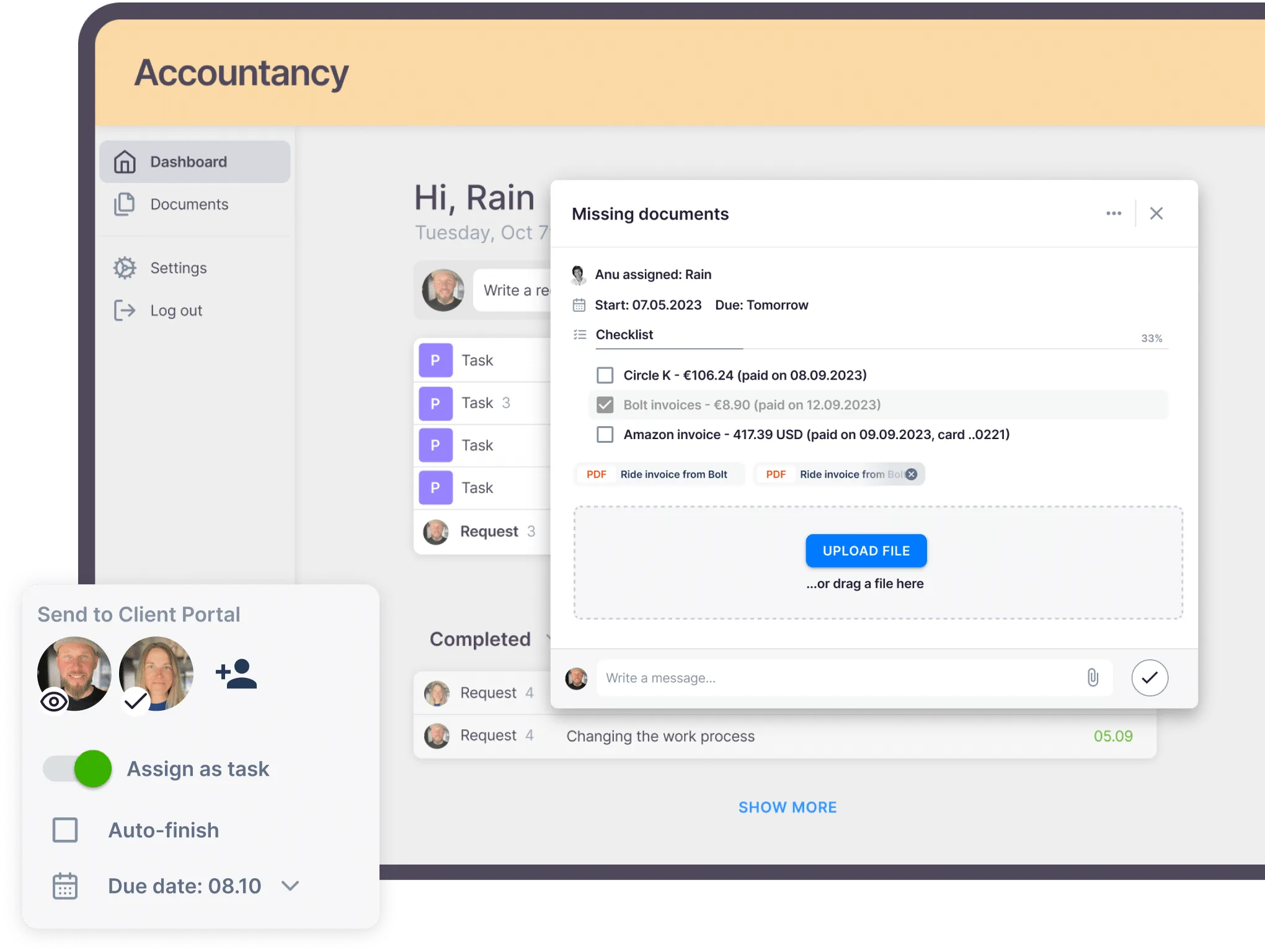
Client communication with an accounting client portal
Uku’s accounting Client Portal is the place to communicate with clients. A beautiful platform to show your clients gives your accounting firm a competitive edge by offering your innovative outlook — and it is where the CRM record turns into customer value, because a client who can self-serve stops waiting on your phone line.
Uku’s Client Portals features include:
- Adding tasks and sending inquiries or questions to the client.
- Adding public messages and internal comments to tasks.
- Receiving missing items, e.g. invoices, documents, etc, from clients faster.
- Personalising the appearance of the portal.
Sales process
In Uku, we recommend the following process for potential customers or leads to becoming real customers.
- Add all potential clients to Uku and create a client profile.
- Create a “Leads” client group of potential clients.
- Create a template with the tasks you do as a sales process.
- Since winning over clients is often not a linear process, it is good to use the option of dependent tasks. With them, you create a smooth workflow—when one task is marked as done, the next appears on the desktop.
- If you have signed a contract with a client, move them to the client group of active clients.
Email automation unites tasks and CRM for bookkeepers
The majority of customer communication is generally done by email. It is also possible to send emails from Uku thanks to Uku’s Emails app.
Letters are often recurring – both in terms of time and clients. Email templates are a great way to make client communication more efficient. Compose the letters you frequently use and automate sending them. To make the process even more convenient, we have composed 11 must-have email templates for accounting practices, which you can adapt according to the data of your accounting firm.
Integrations with accounting software to make the ultimate accounting CRM system
To reduce manual work, Uku has integrations with several accounting software to help you create the ultimate accounting CRM system. Instead of manually collecting data about clients, entries, records, documents, etc., conveniently import the data into Uku. You can also import members added to the client with permissions and much more.
Uku integrates with Xero, Quickbooks, and many more to come.
Analysing real-time data
The Monitoring feature in Uku shows whether the work employees have done corresponds to the amount of work agreed upon by the client. This way, you can continuously monitor the fulfilment of the workload and inform the client before the workload has increased.
The Report feature turns Uku from ordinary work management software to accountants’ best work management software.
Why track time, mark a topic for a task, and collect information about clients if you can’t analyse it?
The report shows how efficiently your team works, how much time they spend on clients, and how well the firm is doing. Uku even automatically creates invoices based on the data from the report.
A CRM for accountants is people and technology together
Successful CRM implementation requires the firm’s partners and practice managers’ commitment to CRM and leadership.
To summarise, a successful CRM for accounting practice needs:
Allocating financial resources. Practice managers must invest in the right technology that is easy to adopt within their practices.
Enthusiasm. Practice managers must be enthusiastic and confident when using CRM. If not, their accountants will likely not get staff buy-in.
Adoption. Practice managers must be committed to using it and sharing the knowledge obtained with staff. So all can understand the value it brings.
Patience. CRM strategy will take time to learn and practice but keep going, the rewards will be worth it in the long term.
Remain focussed. Despite how busy accounting periods become, accounting firms must continue to use CRM.
To achieve CRM success, discuss with everyone concerned what is required and the aims of implementing it. Ensure all are updated, who will be impacted, and when and how changes will occur.
Accounting firm CRM: common questions
Does an accounting firm need a CRM?
Every accounting firm needs a client record. Most do not need a sales CRM. A CRM is built to move deals through a pipeline, and an accounting firm’s core problem is recurring service delivery: who does what for this client, by when, and at what margin. That record belongs in the practice management software the team already opens every morning. Buy a standalone CRM when winning new clients is a staffed process with a named pipeline owner.
What CRM software is best for accounting firms?
There is no single best one, because the question hides two different products. If the firm’s bottleneck is winning work, the answer is a general-purpose sales CRM built for pipelines. If the bottleneck is serving the clients it already has — which is the case for most accounting firms — the answer is a practice management platform with the client record built in, where contacts, access details, scope, work history and profitability sit beside the tasks and invoices for that client. Decide which of those two problems is actually costing the firm money before comparing any feature list, because the two categories are not substitutes for one another.
Is practice management software the same as a CRM?
It overlaps but is not identical. Practice management holds the client record — contacts, notes, documents, custom fields, access rights, the task plan, time and billing — next to the work itself, so nobody maintains client details twice. A sales CRM adds pipeline forecasting, lead scoring and marketing automation, which practice management tools generally do not have. If your bottleneck is delivery, practice management covers the CRM job. If your bottleneck is new business, it does not.
What should an accounting firm CRM store about each client?
The six fields above: identity and contacts, access details, agreed scope and price, work history, correspondence, and hours against fees. The access and profitability fields are the two a general-purpose CRM has no reason to carry, and the two that hurt most when they are missing.
Can accounting software and CRM be the same system?
Ledger software and CRM are different jobs — your bookkeeping tool records transactions, not client relationships. What can genuinely be one system is practice management and CRM: the client profile sits beside that client’s tasks, deadlines, time entries and invoices, and client data imports from your accounting software rather than being retyped.
When is a separate sales CRM worth it?
When someone owns a pipeline as their actual job. If two or more people do nothing but win work, they need forecasting, nurture sequences and lead-source attribution — none of which practice management provides, and all of which justify a second system. Below that threshold, a separate CRM usually becomes a second place to keep the same client details out of date.
Learn more about CRM accounting software and try it out for yourself; book a 30-minute personal Uku demo or start a 14-day free trial — full Elite features, no credit card.
Frequently asked questions
Does an accounting firm need a CRM?
Every accounting firm needs a client record. Most do not need a sales CRM. A CRM is built to move deals through a pipeline, and an accounting firm's core problem is recurring service delivery: who does what for this client, by when, and at what margin. That record belongs in the practice management software the team already opens every morning. Buy a standalone CRM only when winning new clients is a staffed process with a named pipeline owner.
What CRM software is best for accounting firms?
There is no single best one, because the question hides two different products. If the firm's bottleneck is winning work, the answer is a general-purpose sales CRM built for pipelines. If the bottleneck is serving the clients it already has — which is the case for most accounting firms — the answer is a practice management platform with the client record built in, where contacts, access details, scope, work history and profitability sit beside the tasks and invoices for that client. Decide which of those two problems is actually costing the firm money before comparing any feature list, because the two categories are not substitutes for one another.
Is practice management software the same as a CRM?
It overlaps but is not identical. Practice management holds the client record — contacts, notes, documents, custom fields, access rights, the task plan, time and billing — next to the work itself, so nobody maintains client details twice. A sales CRM adds pipeline forecasting, lead scoring and marketing automation, which practice management tools generally do not have. If your bottleneck is delivery, practice management covers the CRM job. If your bottleneck is new business, it does not.
What should an accounting firm CRM store about each client?
Six things: identity and contacts (who signs, who sends documents); access details (which bank, which accounting software, which tax-authority permissions, and who on your side holds them); the agreed scope and price; the full history of work done and by whom; correspondence attached to the client rather than to one inbox; and hours spent against fees charged. The access and profitability fields are the two a general-purpose CRM has no reason to carry.
Can accounting software and CRM be the same system?
Ledger software and CRM are different jobs — your bookkeeping tool records transactions, not client relationships. What can genuinely be one system is practice management and CRM: in Uku the client profile sits beside the tasks, deadlines, time entries and invoices for that client, and client data imports directly from QuickBooks, Xero, e-conomic and others rather than being retyped.
When is a separate sales CRM worth it for an accounting firm?
When someone owns a pipeline as their actual job. If two or more people do nothing but win work, they need forecasting, nurture sequences and lead-source attribution — none of which practice management provides, and all of which justify a second system. Below that threshold, a separate CRM usually becomes a second place to keep the same client details out of date.

Published Dec 9, 2025 · Updated Oct 5, 2026